
Vibe Coding a Real Project Without Losing Control
The setup I use when a project has to survive longer than a weekend.

If you’re reading this, you’re probably already past the beginner stage with AI coding. You’ve got a CLAUDE.md or AGENTS.md. Maybe a folder of Cursor rules. You use plan mode before letting the agent loose, and you’ve learned to keep context windows lean.
That stack gets you a long way. But there’s a point where it stops being enough, and this article is about exactly where — and what to do about it.
Where the usual setup hits a wall
Three things break, and tightening your rules file only fixes the first two.
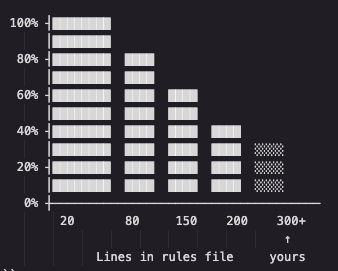
1. Rules get ignored. A rule near the top says “use the project’s naming conventions.” Thirty commits later, the agent generates a file using “basket” instead of “cart” and “user” instead of “customer.” This isn’t a bug — models deprioritize instructions they judge as “might be relevant,” and in a 300-line file almost everything is “might be relevant” to any given task.
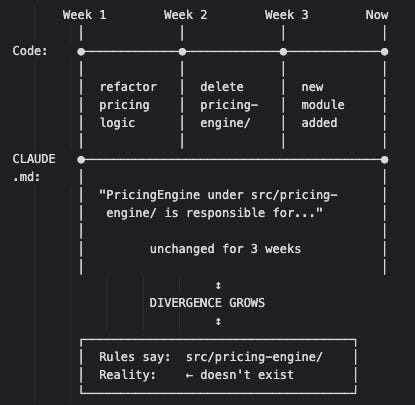
2. Rules drift. The code evolves, the rules file doesn’t. Soon it’s describing modules and folders that were deleted weeks ago. The agent reads it, trusts it, and builds on top of something that no longer exists.
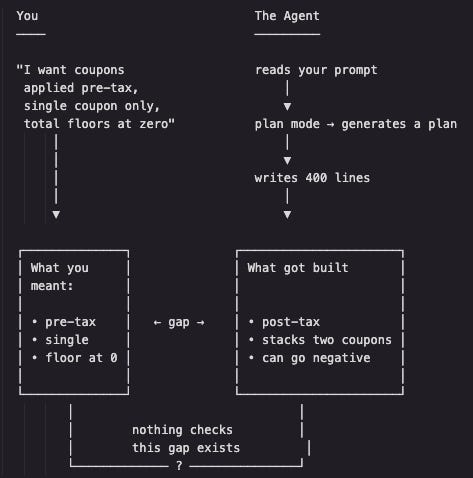
3. The deeper one: nothing checks intent against output. Plan mode gives you a plan. It doesn’t confirm the plan was right. You can still end up with four hundred lines of reasonable-looking code that solves a slightly different problem than the one you actually had.
None of this means rules files are useless. I still use mine. But there’s a layer of work they were never going to do, and that’s what the rest of this is about.
The approach: small skills, not a framework
The tools here are agent skills from Matt Pocock’s open repo. I picked these over full systems like Spec-Kit or BMAD for one reason: those own your whole workflow, so when something breaks inside them, you’re debugging their process instead of your code. These are the opposite — each skill is a short markdown file you trigger only when you need it. Don’t like one? Open it and rewrite it.

They line up against four questions your rules file can’t really answer:
Did the agent understand the work before it wrote anything?
Can that understanding become a plan that doesn’t go stale?
Does the code actually work, or just look like it works?
Is the architecture still holding up after a week of moving fast?
One-time setup
Open a new project in Cursor and paste in a single prompt. It clones the skills repo, installs each skill as a reusable command, and scaffolds the supporting config (a local-markdown issue tracker, a glossary file, a decision log).
Paste this into a fresh Cursor project:
Clone https://github.com/mattpocock/skills into a temp dir and read
from there (don't leave it in this workspace). Inspect the repo so
you understand each skill and its sibling files.
Install these as reusable on-demand prompts using whatever mechanism
THIS version of Cursor supports for custom slash-commands / rules —
pick the current best fit and tell me which you chose and how to
trigger each one. Port every engineering skill plus handoff. Cursor
won't auto-load sibling files, so INLINE each skill's referenced docs
into its body (grill-with-docs←CONTEXT/ADR formats,
tdd←tests/mocking/deep-modules/interface/refactoring,
improve-architecture←LANGUAGE, triage←AGENT-BRIEF/OUT-OF-SCOPE,
prototype←LOGIC/UI); rewrite cross-references to match.
Set up the per-repo config: local-markdown issue tracker
(PRDs/issues under .scratch/<feature>/, Status: line for triage),
default triage labels, single-context domain docs in docs/agents/,
plus CLAUDE.md, a near-empty CONTEXT.md, docs/adr/, and a README.
Print the final file tree, state which Cursor mechanism you used and
why, and confirm the temp clone was removed.
The full prompt is like this. The key detail: it doesn’t hard-code where files go, because Cursor’s command/rules setup changes often. It asks Cursor to pick whatever its current version supports and report back how to trigger each skill. In my case, they install as commands — typed with a slash.
You only run this once per project, and you can rerun it on any new repo.
The commands, and when to use each
I’ll walk these in the order you’d actually use them on a feature. The running example is a small shopping cart module — coupons, tax, totals. Simple on the surface, a swamp of edge cases underneath.
/grill-with-docs — align before you build
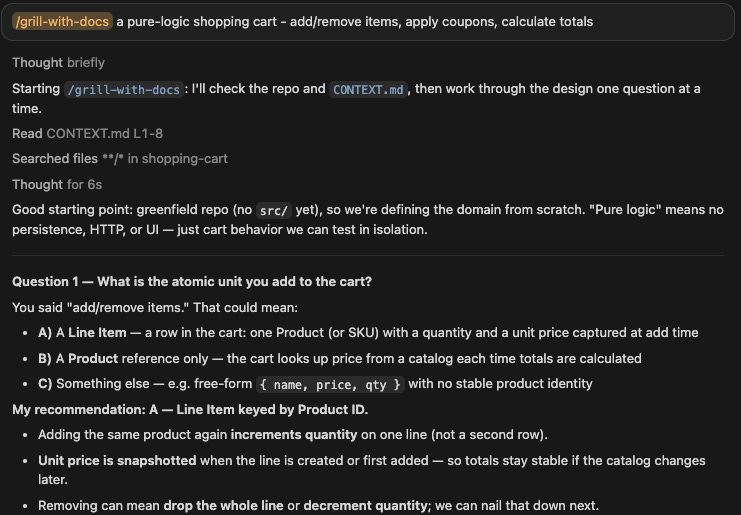
Instead of describing the feature to the agent, this makes the agent interview you — one question at a time, each with a recommended answer. As you answer, it writes the resolved terms into a CONTEXT.md glossary, and records hard-to-reverse decisions as short ADRs (Architecture Decision Records).
This is what fixes the drift problem from earlier. The glossary isn’t a 300-line rulebook the agent skims and forgets — it’s a small, living vocabulary the agent helped write, so it actually gets used. By the end you’ve written zero code but already have a shared definition of “cart,” “item,” “coupon,” and a logged decision like “coupons apply pre-tax, because…”
Writes to: CONTEXT.md (the glossary, at the repo root) and docs/adr/NNNN-*.md (one short file per architectural decision). Both are created lazily — they only appear once there’s something to record.
/to-prd — turn the conversation into a spec
No interview this time. It takes what you already worked out and writes a proper product doc: the problem, the solution, user stories, implementation decisions, and — the underrated part — what’s explicitly out of scope. Writing down what you’re not building is how you stop the agent from gold-plating.
Writes to: .scratch/<feature-slug>/PRD.md (the local-markdown issue tracker set up during install).
/to-issues — slice the plan into runnable pieces
This breaks the plan into vertical slices — each ticket cuts top to bottom (logic, calculation, test) as one thin piece you can actually run and verify. The alternative (all the models, then all the logic, then all the tests) leaves you with layers that have never talked to each other. It also marks which slices an agent can finish unattended versus which need you in the loop.
Writes to: .scratch/<feature-slug>/issues/<NN>-<slug>.md — one file per slice, numbered in dependency order, each carrying a Status: line for triage.
/tdd — build with a real feedback loop
The naive version of test-driven development writes all the tests first, then all the code. It’s a trap: those tests describe what the agent imagined, not what the code does, so they pass while the behavior is broken. Instead, this works one behavior at a time — one failing test, the smallest code to pass it, then the next. Tests only touch the public interface, so they survive refactors.
Writes to: your actual source and test files (e.g. src/cart.ts and src/cart.test.ts). No special doc — this command produces the code itself.
/prototype — feel out a design by driving it by hand
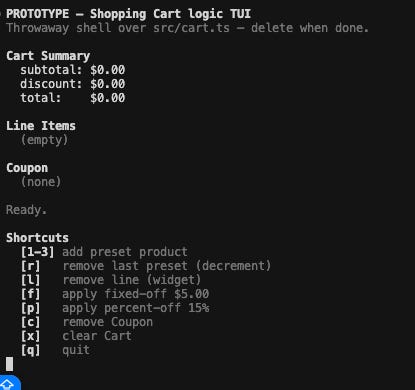
Once the core logic exists, some questions still can’t be answered by reading code or tests — you have to push the thing through real cases and watch it behave. This builds a throwaway prototype to do exactly that. For logic, it’s a small interactive terminal app (a TUI) wrapped around your real module; for UI questions, it’s several different layouts on one screen.
In the cart demo it built a logic-branch TUI over the real src/cart.ts, with keyboard shortcuts to add items, apply and replace coupons, and watch the totals update live — aimed at the edge cases that are hard to reason about on paper: a price mismatch on the same product, 15% off an odd subtotal like $10.01 (does it round half-up to an $8.51 total?), and the discount cap on a small subtotal. You run it with one command:
npm run prototype:cartThe shell is throwaway — no tests, no persistence — but it drives the genuine module, so what you learn is real. You jot the findings in a NOTES.md next to it, then delete the prototype folder once it has done its job.
/diagnose — debug without guessing
For a hard bug, the first move isn’t to start changing lines — it’s to build a fast, deterministic way to reproduce the bug. Once you can reproduce it on demand, most of the work is done. The skill then ranks several testable hypotheses instead of anchoring on the first idea, writes a regression test before the fix, and cleans up its debug logging afterward.
A good demo bug: a coupon worth more than the cart drives the total negative because nothing floors it at zero. Easy to show, instantly understandable.
Writes to: a regression test plus the fix in your source files. Any temporary debug logging is tagged and stripped before it finishes, so nothing extra is left in the repo.
/improve-architecture — keep entropy in check
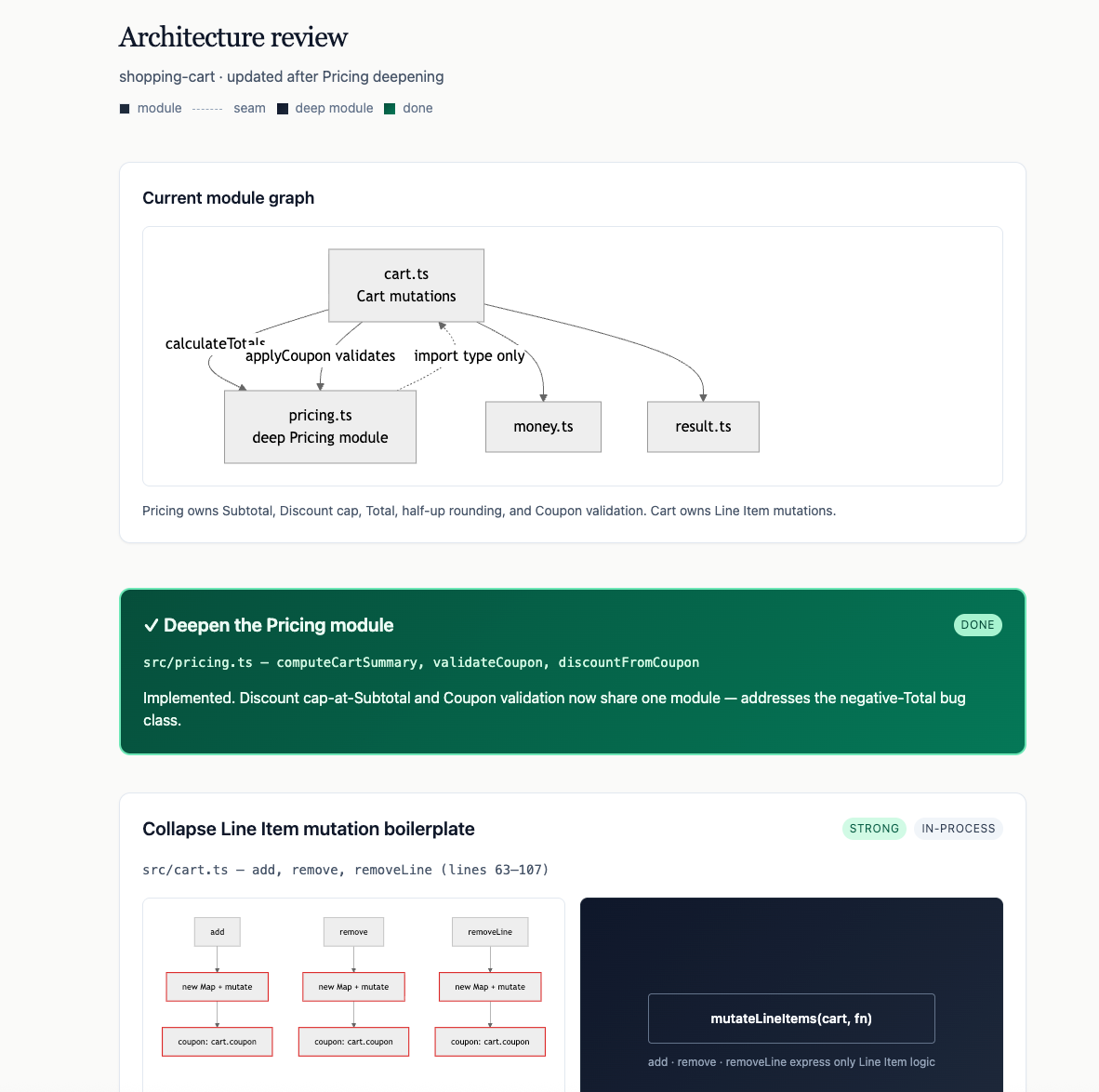
The uncomfortable truth about AI coding is that it produces mess at the same speed it produces features. Every few days, this scans for shallow modules — code where the interface is almost as complex as what it’s hiding — and produces a report with before/after diagrams and a recommendation strength for each.
The mental tool worth stealing is the deletion test: imagine deleting a module. If the complexity vanishes, it was a useless middleman. If the complexity reappears scattered across everything that called it, the module was doing real work. That’s a “deep” module — small surface, a lot underneath — and it’s the shape you want.
Writes to: a self-contained HTML report in your OS temp directory (deliberately outside the repo, so it leaves no trace). If you accept a refactor during the follow-up discussion, those decisions flow back into CONTEXT.md and docs/adr/.
What this is and isn’t
It’s slower than vibe coding on day one. If you need a throwaway prototype for tomorrow’s pitch, just vibe code it — none of this applies. The grilling, the glossary, the tests only start paying off when the thing has to survive real users and you’ll still be in it three months later.
The agent isn’t the engineer. It’s the fastest junior developer you’ve ever worked with — tireless, and perfectly happy to run a bad idea off a cliff at full speed if you don’t hold the map. The job didn’t go away. It moved up a level.