
Use Google's ADK to Build a Multi-Agent System with Live Voice and Rich Content Output
A Quick Tutorial for Using Google's ADK Framework

Voice assistants have become more dominant for chatbot applications nowadays, but most implementations struggle with a fundamental trade-off: providing quick, conversational responses while also delivering detailed analytical insights from AI assistants. Users want immediate answers when they ask “What’s the weather in New York?”, but they also need deeper context—trend charts, historical data, and actionable insights—without waiting through verbose explanations.
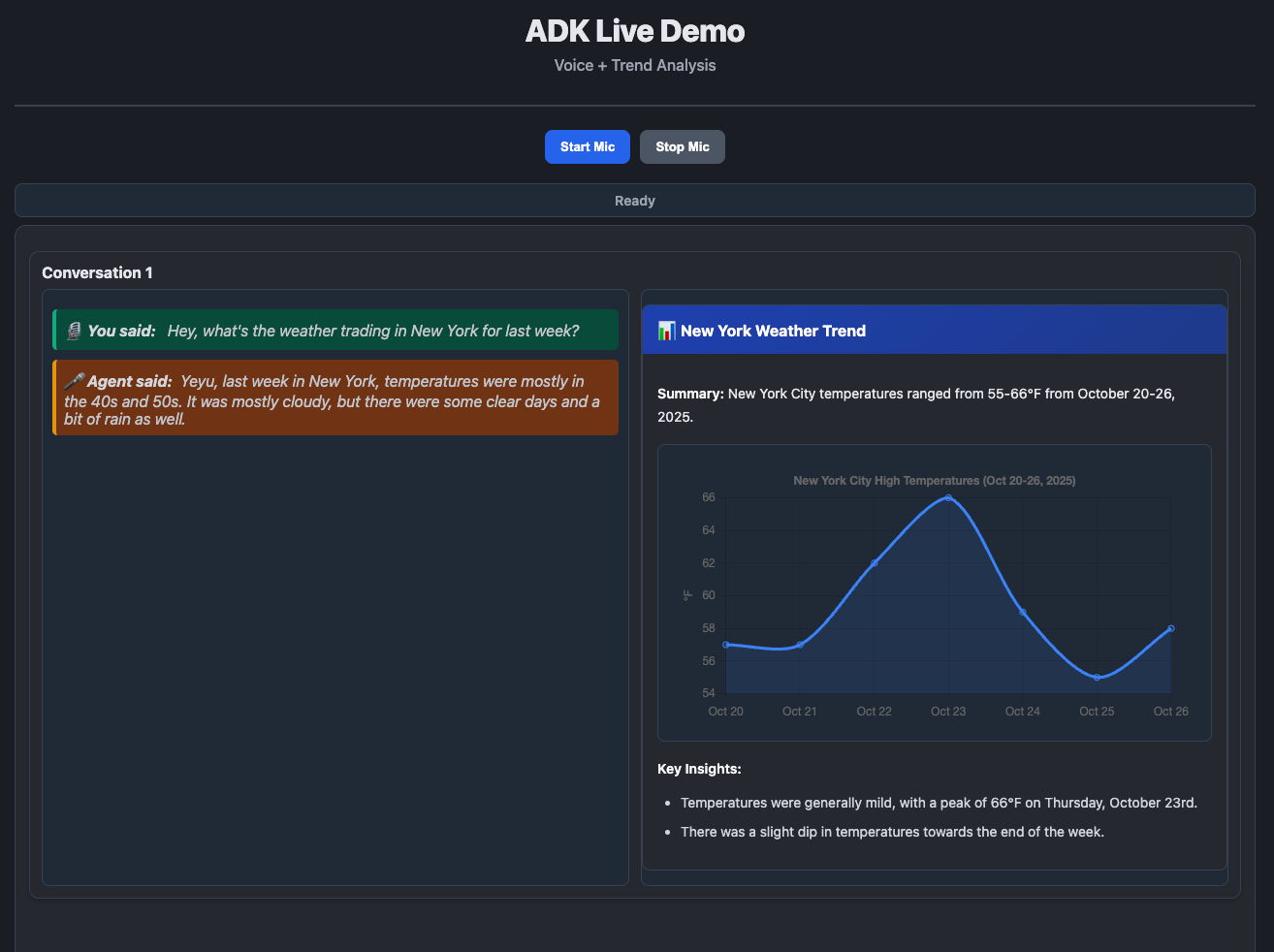
In this post, we’ll walk through extending Google’s ADK (Agent Development Kit) streaming demo to create a production-ready multi-agent system that solves this exact problem. Our implementation features a live audio agent for instant conversational responses and a detail analysis agent that intelligently decides whether to generate visual trend charts based on the conversation context.
Multi-agent Architecture
The key insight driving our architecture is the fundamental constraint of live audio models: the Gemini Live model generates speech and transcript text in perfect alignment—what you hear is exactly what you see. This design principle makes it excellent for conversational responses but inherently unsuitable for structured data or detailed numerical information. You can’t speak a JSON schema or verbally list 20 data points in a user-friendly way.
This constraint leads to our multi-agent approach with two main benefits:
Separation of Conversational and Structured Output: The live agent handles natural speech (”It’s about 75 degrees today”), while the follow-up agent processes rich text and generates structured output (JSON for charts, tables, etc.) without the burden of speech alignment.
Scalable Role Specialization: In production systems, this pattern extends beautifully—different agents can be equipped with specific tools, MCPs, or function sets aligned to their clear roles. One agent converses, others analyze, visualize, or execute actions. This modularity is necessary for complex real-world applications.
Check out the live demo:
The Two-Agent System
Our implementation uses a sequential pipeline where each agent plays a distinct role in the conversation-to-visualization workflow. The first agent handles real-time interaction, while the second agent enriches the response with structured analytics.
Live Agent (
gemini-2.5-flash-native-audio-preview)Handles real-time audio input/output streaming
Provides brief, conversational responses (1-2 sentences)
Uses Google Search for grounding
Generates transcripts of both user input and agent output
Detail Analysis Agent (
gemini-2.5-flash)Analyzes conversation transcripts
Intelligently determines if trend analysis is needed
Generates Chart.js-compatible JSON for visualization
Skips unnecessary processing for simple queries
Orchestration Strategy
Our orchestration approach is straightforward: run the live agent first, capture transcripts, then trigger the detail agent with shared context. The live agent streams audio responses in real-time, while simultaneously accumulating full transcripts of both user input and agent output. When the conversation turn completes, these transcripts are passed to the detail agent through session state initialization, allowing it to analyze the conversation without polluting its own history with audio-specific events.
Keep reading with a 7-day free trial
Subscribe to Lab For AI to keep reading this post and get 7 days of free access to the full post archives.